RiscFree™ for Embedded Software Development
RiscFree™ for Embedded Software Development is a Visual Studio Code extension for embedded development from Ashling. Install an Ashling SDK, import an example or open your own project, build it, and debug it on hardware through an Ashling probe or on the QEMU simulator.
New here?
Follow the Quick start. After you install the extension, the Get Started walkthrough on the VS Code Welcome page covers the same steps inside VS Code. No board yet? Use the Ashling SDK for RISC-V QEMU; it needs no probe and no licence.
Features
- Arm, ARC and RISC-V hardware debugging: Debug on Arm, ARC and RISC-V targets through Ashling Vitra-XS, Opella-XD and Opella-LD probes.
- RISC-V QEMU simulator debugging: Run and debug RISC-V programs without target hardware or a licence.
- CMake and Make builds: Build, rebuild and clean from the Ashling Project View.
- Graphical debug configuration: Set up probes, targets and startup options without editing
launch.json. - RTOS-aware debug: Inspect tasks and their state while debugging FreeRTOS, Zephyr and µC/OS-II applications.
- Simultaneous heterogeneous multicore debug: Debug several cores of different types on the same device at the same time, each in its own debug session.
- Peripheral register inspection: Inspect and change peripheral registers and their bit fields on supported devices.
- SDK Manager: Install, verify and update Ashling SDKs. Each SDK bundles the toolchain, the Ashling GDB server or QEMU, and the build tools for its targets, and each project uses its own SDK and version.
- Example projects: Import ready-to-build examples from installed SDKs.
At a glance
| Capability | Support |
|---|---|
| Debug targets | Arm hardware, RISC-V hardware, RISC-V QEMU simulator |
| Debug probes | Ashling Vitra-XS, Opella-XD, Opella-LD |
| Multicore debug | Simultaneous debug of heterogeneous cores |
| Supported RTOS | FreeRTOS, Zephyr, µC/OS-II |
| Build systems | CMake, Make |
| Host platforms | Windows x64, Linux x64 |
Supported SDKs
The SDKs below are published in the Ashling SDK registry. Select Check for updates in the SDK Manager to see the current list and versions.
| SDK | ID shown in VS Code | Target | Examples included | Licence required | Download (approx.) |
|---|---|---|---|---|---|
| Ashling SDK for RISC-V | risc-v-sdk |
RISC-V hardware through Ashling probes | Yes | Yes | 1.0 GB |
| Ashling SDK for RISC-V QEMU | risc-v-sdk-qemu |
RISC-V on the QEMU simulator | Yes | No | 0.7 GB |
| Ashling SDK for Arm AArch32 | arm-32-sdk |
32-bit Arm hardware | Yes | Yes | 1.1 GB |
| Ashling SDK for Arm AArch64 | arm-64-sdk |
64-bit Arm hardware | No | Yes | 0.7 GB |
| Ashling SDK for VSD | vsd-sdk |
VSD (VLSI System Design) RISC-V boards through an Ashling Opella-LD probe — Windows only | Yes | No | 0.8 GB |
VS Code shows the short ID, for example risc-v-sdk 26.4.1, on a project's SDK Selection row and in some messages. Download sizes are for the latest version of each SDK; installed SDKs take more space once unpacked.
SDKs that run without an Ashling licence are marked No license required in the SDK Manager. The SDK Manager only lists SDKs built for your operating system, so the Windows-only Ashling SDK for VSD doesn't appear on Linux. See what's free and what needs a licence.
System requirements
| Item | Requirement |
|---|---|
| Visual Studio Code | Version 1.82 or later (download) |
| Host operating system | Windows 10/11 x64, or Linux x64 (tested on Ubuntu 22.04 LTS and 24.04 LTS) |
| Network | Internet access to install SDKs (GitHub and Amazon S3). Installed SDKs work offline. |
| Disk space | At least 1 GB free in the SDK root folder (the folder SDKs are installed in, by default .vcpkg in your home folder), plus the SDKs you install (each a 0.6–1.1 GB download, see Supported SDKs) |
| Debug hardware | Ashling Vitra-XS, Opella-XD or Opella-LD probe and cables for your target. VSD boards need an Opella-LD. Not needed for QEMU. |
| Licence | An Ashling GDB server licence for Arm, ARC and RISC-V hardware debugging — see Activate a licence. Not needed for QEMU or VSD boards. |
A tour of the Ashling view
Select the Ashling icon ( ) in the Activity Bar to open the extension's view. It has three sections:
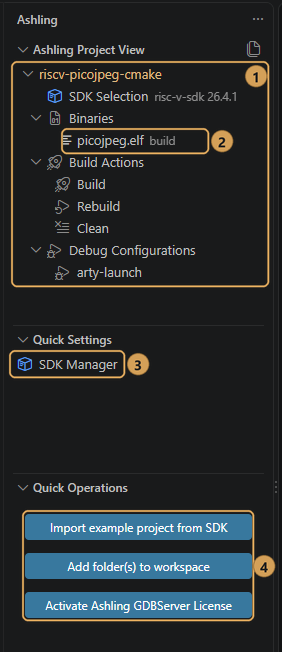
- Ashling Project View ①
-
One entry per folder in your workspace. Each project shows its SDK Selection, Binaries, Build Actions (Build, Rebuild, Clean) and Debug Configurations.
Binaries ② lists the
.elfand.axffiles in the project, such aspicojpeg.elfafter a build.Two icons in the view's title bar switch what each project shows: Show Project Files (two-pages icon) shows the project's files, and Show Build and Debug Actions (tree icon) switches back.
- Quick Settings ③
- Holds SDK Manager, which opens the Ashling SDK Manager.
- Quick Operations ④
- Holds shortcuts to Import example project from SDK, Add folder(s) to workspace and Activate Ashling GDB Server License.